

Table of Contents
- Introduction
- Editor’s Choice
- General Comparison of PayPal Vs. Stripe
- Global Share of Payment Technologies
- PayPal Vs. Stripe’s Comparison Statistics By Global Reach
- Most Used Payment Processors By Websites
- Country-Wise Customer Analysis
- PayPal Vs. Stripe Fees Statistics
- Pros And Cons Of PayPal And Stripe
- Account Setup Processes Of PayPal vs. Stripe
- Which One Fits Your Business Best?
- Conclusion
Introduction
PayPal Vs. Stripe Statistics: PayPal and Stripe both help businesses to make payments, but they’re built for very different purposes and use cases. PayPal is a fast, familiar option, trusted by global customers, and easy to switch on for quick sales. Meanwhile, Stripe is the power tool used by teams that want more control, stronger customisation, and a setup that lets them handle subscriptions, advanced billing, and growth at scale.
This article includes several current statistical analyses from different insights those goes beyond a simple feature list and focus on the differences that actually impact day-to-day business. Using insights gathered from several online sources, provides a comparison between PayPal and Stripe on the areas that matter most: pricing transparency, ease of development, and support for global payments, keeping enterprise teams and large merchants at the centre of the discussion.
Editor’s Choice
- Stripe charges 2.9% + 0.30 USD per online transaction (plus any third-party fees), while PayPal charges 3.49% + 0.49 USD per transaction, with a few exceptions.
- Stripe’s chargeback fee is 15 USD, compared with PayPal’s 20 USD.
- PayPal operates in 200+ countries/regions and supports 25 currencies, while Stripe supports 46 countries and 135+ currencies.
- PayPal lists an international fee of 1.5%, while Stripe lists 1% plus 1% for currency conversion.
- Both providers are PCI compliant, which supports payment security.
- Account setup takes about 5 minutes for both services.
- PayPal reports 1000+ integrations (often buyer-focused), while Stripe reports 700+ integrations (often business-focused).
- Common PayPal integrations include QuickBooks, Facebook, Salesforce, Shopify, and AWeber.
- Common Stripe integrations include WooCommerce, Calendly, Zapier, Jotform, and AWeber.
- PayPal does not offer a customizable checkout, while Stripe does.
- PayPal offers phone support 5-8 (Mon-Fri) and 6-6 (Sat-Sun) PST, plus 24/7 chat and documentation, while Stripe offers 24/7 chat and phone, plus email and documentation.
- The average payout time is approximately 2 business days for PayPal, while Stripe reports next-day payouts.
General Comparison of PayPal Vs. Stripe
- According to 6sense, PayPal and Stripe both compete in Project Collaboration and Payment Management tools.
- In Payment Management, Stripe ranks #1 with 597,490 customers, while PayPal ranks #2 with 528,944 customers.
- Stripe holds about 34.64% market share in this category, compared with PayPal’s 30.67%, indicating Stripe has a modest lead.
- Forbes’ report further stated that PayPal has a higher user rating of 3.8 stars, while Stripe has a rating of 3.0 stars.
- Neither PayPal nor Stripe offers a free trial period.
- PayPal supports 25 currencies, whereas Stripe supports 135+ currencies.
- PayPal accepts 41 payment options, while Stripe accepts 120+ payment options.
- Buy Now, Pay Later pricing starts at 4.99% + USD 0.49 for PayPal and 5.88% + USD 0.30 for Stripe.
- PayPal includes rewards/loyalty programs, while Stripe can offer loyalty features through integrations.
By Users, Business Reach, and Adoption
- In the second quarter of 2025, PayPal had 435 million active users worldwide, including 87 million in the US.
- In the first half of 2025, the platform also gained 6 million new business accounts, and the United States’ small-business adoption rate accounted for 64%.
- PayPal remains strong in consumer checkout, with 60% of the top e-commerce stores offering it.
- Meanwhile, Stripe serves 5.3 million business customers, up 14.8% year over year, and adds about 35,000 new businesses each month in 2025.
- It is widely used by large firms too, supporting 92% of the Fortune 100.
- Stripe further processes payments for 70% of the top subscription platforms in 2025.
- Stripe’s solopreneur use rose 22% thanks to low-code and no-code tools.
By Financial Report
- Coinlaw.io reports that PayPal earned USD 32.1 billion in 2025, an 8.6% increase from the year before, while Stripe brought in USD 18.9 billion, up 11.2% from USD 17 billion in 2024.
- PayPal’s operating margin captured around 19.4%, while Stripe’s increased to 12.2%.
- Meanwhile, PayPal reported net income of around USD 5.3 billion, while Stripe reported USD 2.6 billion.
- PayPal’s Braintree revenue grew 13.5% and added USD 7.4 billion, and recurring revenue made up 42% of PayPal’s total.
- Stripe Treasury’s profit reached USD 3.1 billion in balances and payouts.
- Revenue Intelligence generated USD 1.2 billion in upsell income and added USD 320 million in ARR from enterprise use.
By Total Payment Volume
- According to coinlaw.io, in 2025, PayPal’s total payment volume reached around USD 1.92 trillion, while Stripe’s reached USD 1.14 trillion.
- PayPal accounted for around USD 760 billion in global mobile payments, compared with Stripe’s USD 520 billion.
- Stripe’s B2B volume accounted for USD 312 billion, and PayPal’s P2P volume accounted for USD 315 billion.
- Stripe’s recurring billing reached USD 190 billion via Billing and Invoicing APIs.
- The average payment size was USD 84.60 on PayPal, compared with USD 98.10 on Stripe.
(Reference: coinlaw.io)
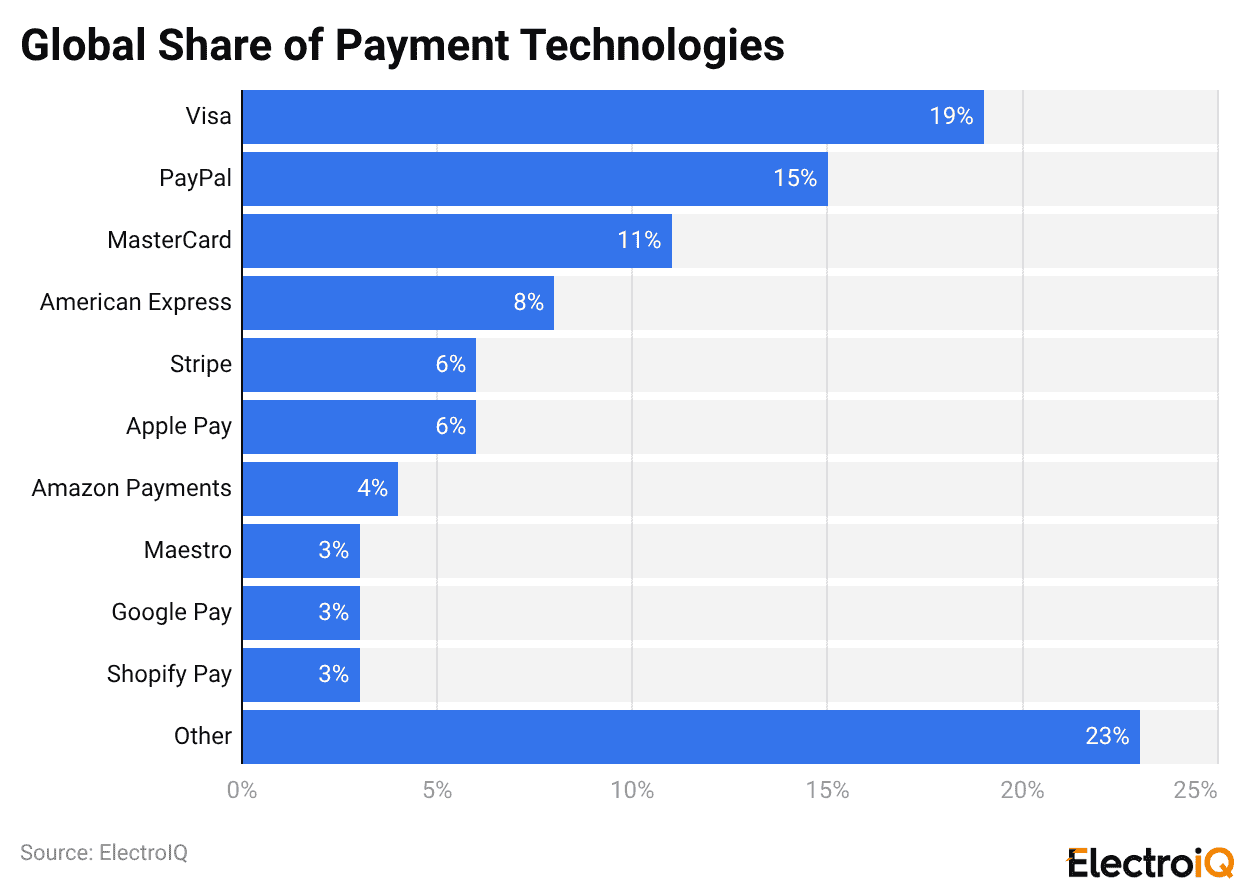
- In 2025, Visa remained the top payment technology worldwide, with a 19% share, followed by PayPal at 15%, MasterCard at 11%, and American Express at 8%.
- Meanwhile, Stripe and Apple Pay each hold 6%, while Amazon Payments has 4%, besides, Maestro, Google Pay, and Shopify Pay each have a 3% share.
- All other payment technologies together account for the largest share at 23%.
In IT Companies
- Stripe accounted for the most integrated payment platform, with a 80.10% share, and PayPal, with 74.30%.
- Coping with the crushing market dominance of Stripe and PayPal, Shopify Payments secured 41.50%, followed by Square (17%), Klarna (17%), Braintree (15.20%), HubSpot payments (8.80%), Mollie (8.80%), BitPay (7.60%), Adyen (5.80%), Helcim (2.30%) and other options (7.40%).
PayPal Vs. Stripe’s Comparison Statistics By Global Reach
| Factor | PayPal | Stripe |
| Geographic availability | Available in 200+ countries/regions, with a broad reach across emerging markets. | Works in about 46 countries, mainly strong in North America and Europe |
| Currency conversion rate markup | About 3.5% to 4% above wholesale rates, based on rates updated twice daily. | About 1% above wholesale rates, with clearer mid-market pricing. |
| Local payment methods | Fewer, mostly card-focused with some regional wallets. | Many local options (e.g., iDEAL, Alipay, SEPA, WeChat Pay, Pix). |
| Settlement speed | Timing can vary; holds up to 21 days are common. | Typically T+3, varies by country; payouts are usually predictable. |
| Regulatory compliance | More complex checks; account limits happen more often. | KYC is generally smoother, with rules that vary by country. |
| Market access | Stronger coverage in emerging markets with wider overall reach. | Smaller presence in parts of Africa/Asia; more focused on developed markets. |
By Mobile and E-commerce Integration
- According to Coinlaw.io, in 2025, PayPal handled USD 760 billion in mobile commerce, and One Touch reached 310M users.
- Moreover, the express Checkout increased conversions by 28% in A/B tests at U.S. retailers, while QR payments fell by 12% post-pandemic.
- Checkout speed accounted for more than 1.3s, decreased by 2.1s in 2023.
- Stripe’s mobile SDKs power 72% of U.S. app-based commerce, and in-app checkout cuts abandonment 19% on average in 2025.
- Stripe supports Google Pay, Apple Pay, and Samsung Pay in 100% of integrations.
- Stripe Terminal processed USD 11.3 billion in U.S./EU in-store payments, while mobile optimisations accounted for 41% of retail and food delivery transactions.
By Data and Analytics
| Metrics | PayPal | Stripe |
| Dashboards | Basic transaction/checkout tracking with limited customisation. | Real-time views with AI alerts, drill-downs, and strong filtering. |
| Transaction detail | Standard-level transaction detail. | Rich metadata, approximately 3-hour refresh, Sigma SQL, and broad APIs. |
| Revenue analytics | Basic revenue reporting. | Configurable MRR/churn, subscription lifecycle, revenue recognition, and billing analytics. |
| Customer insights | Customer segmentation and payment-channel views. | Behaviour analysis and conversion suggestions. |
| Fraud/risk | ML fraud detection started at around 69% accuracy. | Stripe Radar with natural-language rules; about USD 0.05 per screened transaction. |
| Data export | Reporting APIs plus manual exports. | Native Snowflake/Redshift integrations, automated ETL, strong documentation. |
| Subscriptions | Simpler recurring billing tracking. | Stripe Billing with detailed subscription metrics. |
| Predictive analytics | Internal ML with limited external access. | AI insights, 90%+ precision anomaly detection. |
By Service Comparison
PayPal:
- PayPal lets businesses accept payments in multiple currencies and automatically withdraw funds in INR.
- It offers payment links and connects with e-commerce platforms for both online and in-person selling.
- Buyers can pay by bank transfer, debit card, Apple Pay, or PayPal, and eligible transactions may qualify for buyer and seller protection.
Stripe:
- Stripe gives businesses tools for billing, invoicing, payment links, and embedded checkout. Its APIs and SDKs help teams create custom payment processes.
- In India, it supports card payments for receiving international money.
- Stripe Radar uses AI to screen fraud, recurring invoices run automatically, and analytics help track payments, fees, and payouts.
By Developer Experience
| Areas | PayPal | Stripe |
| API docs & examples | Regular docs with simple code snippets. | Interactive docs with tailored examples and prefilled API keys. |
| Setup complexity | Quick setup with minimal coding. | Needs skilled developers; offers more control. |
| Checkout branding | Limited branding; full branding may need a Pro plan. | Full white-label, on-site checkout. |
| Testing tools | Basic sandbox. | Workbench with multiple separate test environments. |
| Error handling | Standard error codes; limited debugging. | Grouped errors with more detailed debug info. |
| Support | Mainly business hours. | 24/7 developer support. |
| SDK coverage | 6+ languages. | 8+ languages plus mobile SDKs. |
| Integrations | Common e-commerce platforms. | 660+ integrations and 450+ extensions. |
| Learning curve | Easier to learn. | Steeper; needs more developer resources. |
By Customer Satisfaction and Support Ratings
- In 2025, Stripe led in usability, with 92% developer satisfaction, and its dashboard earned a 9.5/10 UX score.
- Stripe’s NPS is 67, up from 61 last year, and its support chat now averages 2.7 minutes per interaction.
- Stripe also rolled out 24/7 live support for all enterprise tiers, officially launched in March 2025.
- PayPal reported around 78% overall customer satisfaction, with faster resolution in Q1 2025, and an AI help assistant added 31% to resolution rates.
- PayPal’s NPS is 54, its Trustpilot rating is 4.3 stars from 92,000+ reviews, and it settled 94% of disputes within 72 hours, up from 88% last year.
By Security Features
- PayPal (Enterprise/Braintree) and Stripe are PCI DSS Level 1 providers.
- Venmo is certified on PCI DSS v4.0.1, and Stripe gets yearly QSA audits.
- PayPal has SOC 2 Type 2 each year, plus bridge letters, while Stripe has SOC 1/SOC 2 Type II and SOC 3.
- PayPal can share its ISO 27001 certificate on request, but Stripe does not list ISO 27001.
- PayPal secures card details with tokenisation, including network tokens, so real card numbers are not exposed during payment flows.
- Stripe protects data using tokenisation and AES-256 encryption for information stored on its systems, and it reviews access to sensitive card data areas every quarter.
- Both PayPal and Stripe require TLS 1.2 or higher to protect data in transit.
- Stripe reported around 80% less card-testing attacks, even as overall fraud increased by 11%.
- Stripe is listed on CBPR/PRP and the EU-US/UK/Swiss Data Privacy Framework, while PayPal highlights its own privacy review checks.
By Payment Processing Time
- Fast transfer: With PayPal, Instant Transfer usually reaches your bank or debit card in minutes, but some banks may take up to 30 minutes.
- If it is still missing after 30 minutes, PayPal recommends contacting to habank, as PayPal cannot change the transfer status.
- With Stripe, Instant Payouts (if available) can send funds to a linked debit card in minutes, usually for an extra fee.
- PayPal often completes bank transfers within 1 business day, but bank clearing can take 3-5 business days (excluding holidays).
- Stripe standard payouts usually take 2-7 business days.
- PayPal debit transfers take almost 48 hours, and mailed checks take around 10 business days.
- Stripe pays out to bank accounts, and timing depends on account settings and risk factors.
Most Used Payment Processors By Websites
- Google Pay is used on about 1.84 million websites worldwide, followed by PayPal Button (1.40 million), PayPal Express Checkout (1.34 million), and Stripe (1.31 million).
- Klarna appears on around 0.79 million sites as a payment processor, followed by PayPal (0.23 million), Amazon Payments (0.20 million), Braintree (0.15 million), and PayPal Donate Button (0.12 million).
Country-Wise Customer Analysis
(Source: 6sense.com)
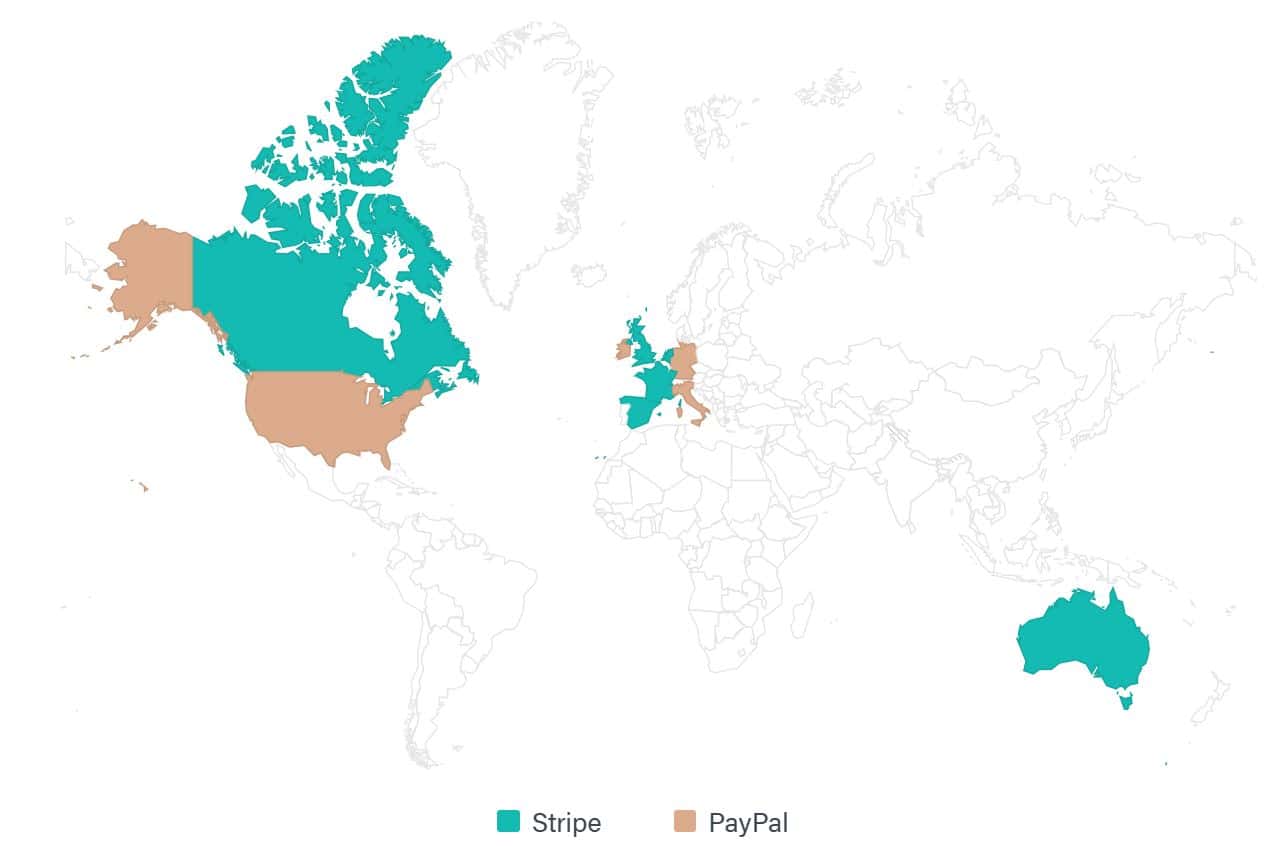
| Country | PayPal Customers | Stripe Customers |
| United States | 309,031 | 265,161 |
| Canada | 20,273 | 26,144 |
| Spain | 9,073 | 17,694 |
| France | 15,453 | 32,021 |
| United Kingdom | 45,925 | 69,600 |
| Italy | 15,067 | 14,412 |
| Germany | 30,647 | 27,777 |
| Ireland | 0 | 7,521 |
| Netherlands | 5,177 | 10,457 |
| Australia | 20,165 | 30,095 |
PayPal Vs. Stripe Fees Statistics
| Fee category | PayPal | Stripe |
| Standard Domestic Fees | 2.99% + USD 0.49 (goods/services) to 3.49% + USD 0.49 (guest checkout), varies by payment type | 2.9% + USD 0.30 per transaction, consistent across payment methods |
| International Transactions | 6-8% total (1.5% international + 3-4% conversion above base rate) | 4.9% + USD 0.30 (includes 1% international + 1% conversion fees) |
| FX exchange | 2.5% to 4% markup | 2% FX markup (built into the overseas rate) |
| Chargeback price | USD 15 to 20 | USD 15 |
| Micropayments | Optimized 5% + USD 0.05 rate for transactions under USD 10 | Same 2.9% + USD 0.30 rate applies to all transaction sizes |
| Free trial | No | |
| Basic Plan | Free | |
| Dispute cost | May apply, depending on the case | Included as part of the chargeback process |
| Payout fee | May apply (depends on account type and payout method) | None |
| Subscription payments | USD 10/month recurring billing fee plus standard transaction rates | 0.5%-0.8% additional fee through the Stripe Billing platform |
| Extra features | Advanced options like recurring billing may cost extra | Billing, Connect, Radar (may add extra costs) |
Pros And Cons Of PayPal And Stripe
Pros:
- PayPal is fast to get started with minimal setup, with strong brand trust with shoppers, and offers buyer and seller protection programs.
- Stripe is cheaper in many cases, promotes strong checkout control, works well for subscriptions, and includes advanced fraud tools.
Cons:
- PayPal fees can be complex and higher, with extra monthly charges applied to some plans; customisation is limited; and subscription tools can create vendor lock-in.
- Whereas Stripe’s setup is more technical, it is less familiar to everyday customers, and payouts may experience an initial delay before reaching the bank account.
Account Setup Processes Of PayPal vs. Stripe
PayPal:
- Visit the PayPal homepage, click “Sign Up,” and select a Business Account to start the registration.
- Enter users legal first and last name, email address, and password, then click “Agree and create account” to open the account.
- To verify the business, add the business name, phone number, and physical address.
- Select business type, enter product/service keywords, estimate monthly sales, and add a website if the user has one.
- Complete identity checks by providing users’ social security numbers, date of birth, and home address.
Stripe:
- Create a Stripe account by entering your email address and setting a strong password on Stripe’s website.
- Confirm identity by entering the text message code sent to the user’s respective mobile phone.
- Add physical address and select business type (for example, “individual” if you have not filed formal paperwork).
- Describe what the user wanted to sell by adding a website and service description, and choose the text required to appear on the statement.
- Complete the verification by entering legal details (name, date of birth, phone, and the last 4 digits of your SSN), adding your bank account and routing numbers, then reviewing and submitting the form.
Which One Fits Your Business Best?
PayPal:
- PayPal is well-suited for businesses that want to start accepting online payments quickly with minimal setup.
- A just.ai report says it suits online-only stores, freelancers, solo sellers, nonprofits, and casual merchants.
- It is also common on marketplaces like eBay and Etsy.
- Its biggest strengths are ease of use and the trust many customers already have in the PayPal brand, even though it gives less control for advanced payment changes.
Stripe:
- Digital marketing companies use Stripe because it allows more flexibility and supports custom payment features.
- It matches startups, SaaS and subscription businesses, and companies selling across several countries.
- It is better to have a strong developer tool with simple payment options, such as links and hosted Checkout, as well as in-person payments via Stripe Terminal for shops, events, and mobile sellers.
Conclusion
At the end of the comparison, it’s clear that many businesses find they work better together than as direct rivals. PayPal is the best fit when you want quick customer trust, a familiar checkout, and an easier payment option for first-time and international buyers. On the other hand, Stripe is the better choice when users need more control, deeper customisation, and billing tools that can grow with their business.
Several fast-growing brands use PayPal to serve wallet-first customers, while Stripe runs the flexible payment setup in the background. The best option depends on customers’ needs, growth plans, and the level of control they need.