Stellar Converter for MBOX Detailed Review: MBOX to PST Converter Tool

Updated · Jan 08, 2026


Table of Contents
Stellar Converter for MBOX makes it simple to migrate emails from MBOX files to Microsoft Outlook. Many popular clients, such as Thunderbird, Apple Mail, Gmail, and other MBOX-based applications, archive messages in the MBOX format, which Outlook can’t open directly. This is where the converter helps by turning MBOX to PST file format that Outlook supports. With step-by-step guidance, even first-time users can complete mailbox conversions with confidence. During export, it retains folder hierarchy, message sequence, and key email properties. After conversion, the resulting PST imports into Outlook fast for organised access.
Editor’s Choice
- Converts MBOX (and related formats such as MBS/MBX/RGE) from popular email clients to Outlook-ready PST files while preserving the original folder hierarchy.
- It works with MBOX files from Gmail, Thunderbird, Apple Mail, Eudora, and many others.
- Supports Microsoft Outlook 2021, 2019, 2016, 2013, 2010, and 2007.
- The Corporate plan costs USD 39 per year and provides comprehensive conversion and export capabilities.
- With 100% precision and accuracy, it saves MBOX data by converting it to PST.
- Built-in “Find” feature helps locate MBOX files on a selected drive/system, handy when you don’t know where the mailbox file lives.
- Auto-splits large PST files at approximately 45 GB to reduce the risk of oversized PST hassles during/after conversion.
Key Features of Stellar Converter for MBOX
- Supports multiple email clients: It works with MBOX files from Gmail (through Google Takeout), Thunderbird, Apple Mail, Eudora, and many others. The user selects the source app, and the tool sets the right options.
- Keeps folders in order: The same folder and subfolder layout is maintained in the PST file, so emails stay neatly arranged rather than mixed.
Shows a preview first: The trial version can scan and display emails, attachments, and folders before saving. This helps confirm the mailbox is opening correctly. - Offers additional saving options: In addition to PST, emails can be saved as MSG or EML. The Technician edition also supports exporting to Office 365 and to formats such as PDF, HTML, and RTF.
- Filters by date: Conversion can be limited to a selected time period, which is useful when only newer emails are needed.
- Excludes chosen senders: Emails from specific people can be removed before saving, reducing cleanup work later.
- Splits large PST files: When a PST file reaches about 45 GB, it is automatically split to prevent Outlook from slowing down.
- Finds missing MBOX files: If the file location is unknown, the tool can search a selected drive and list compatible files.
Technical Specifications of Stellar Converter for MBOX
| Category | Specification |
| Supported email clients | Converts MBOX mailboxes from 17+ email clients. |
| Supported Outlook versions | Supports Microsoft Outlook 2021, 2019, 2016, 2013, 2010, and 2007. |
| Operating system | Windows 11, 10, 8.1, 8 (software is listed as 64-bit only). |
| Processor | Intel-compatible x64-based processor |
| Memory (RAM) | 4 GB minimum, 8 GB recommended. |
| Storage | 250 MB free space for installation. |
| Large PST handling | Auto-splits PST at approximately 45 GB (when Auto-Split is selected). |
| Output/export formats | The Technician version supports saving to Office 365 and formats such as RTF, PDF, and HTML (in addition to PST). |
Pricing Analyses of Stellar Converter for MBOX
| Plan | Price Per Year | Detailed |
| Corporate | USD 39 | This plan helps a user convert MBOX mailboxes to a new PST file that opens in Outlook without changing the mailbox content. It suits basic migrations from common MBOX programs. |
| Technician | USD 99 | This option is designed for technicians or teams that need more export options and faster delivery to Microsoft services. Such as exporting the converted data to Office 365 and Live Exchange. |
How to Use Stellar Converter for MBOX?
Step 1:
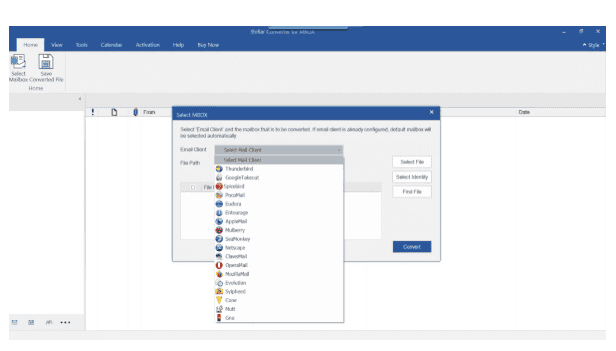
- Download Stellar Converter for MBOX from the official Stellar website and install it (it requires approximately 250 MB of free disk space).
- After setup is complete, open the app to start using it.
Step 2:
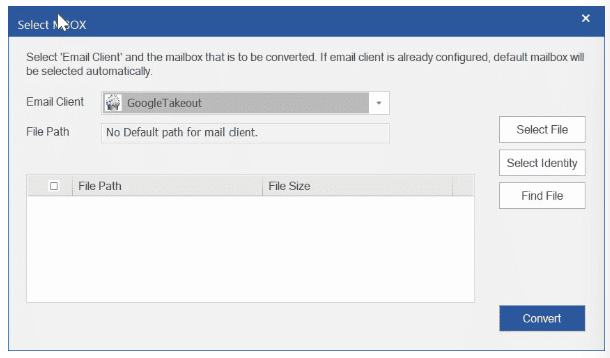
- On the screen, they pick an email app.
- They chose Gmail for Google Takeout files.
- For Mozilla exports, they select Thunderbird or the matching option.
Step 3:
- Use Select File to look for the MBOX file on the device.
- If it is missing, use Find to search a drive or folder.
- The program will automatically detect MBOX, MBS, MBX, and RGE files.
Step 4:
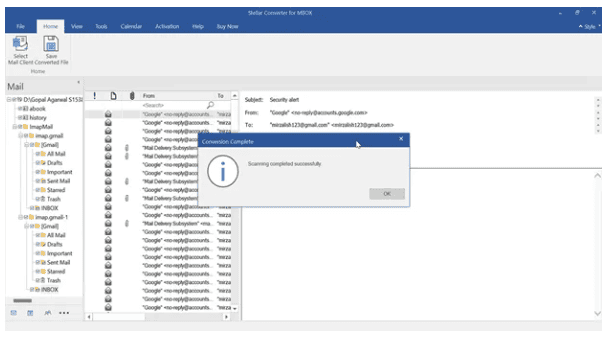
- Select Convert to begin scanning.
- The program reads the MBOX file and displays all messages in a three-panel preview.
- Folders stay on the left, emails appear in the centre, and the full message is shown on the right.
Step 5:
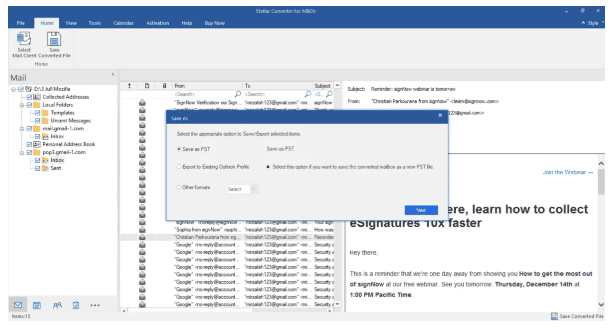
- Review the preview to ensure your information is correct and that folders appear properly.
- Open a few emails to confirm attachments and message details were transferred correctly.
Step 6:
- When ready, they click Save Converted File and choose PST as the output format.
- They select to create a new PST file or add the data to an existing one.
Step 7:
- They can filter emails by date to narrow results.
- They may exclude senders and auto-split a big inbox.
Step 8:
- Select a folder to save the file, then click OK.
- The program will create a PST file and show progress.
- After it gets finished, the PST can be imported into Outlook using File > Open > Import.
Top Use Cases of Stellar Converter for MBOX
- Moving mailboxes from Thunderbird to Outlook can be confusing, particularly when the mailbox is large.
- Skilled handling is required for the manual approach, which also demands time and careful effort.
- To simplify migration, Stellar Converter for MBOX converts Thunderbird MBOX data to a PST file for Outlook.
- Manually sending MBOX emails to Office 365 can be time-consuming and may cause errors.
- Stellar MBOX to PST Converter reduces that risk with a simple, easy-to-use interface.
- It also provides step-by-step guidance throughout the conversion and migration process.
- During transfer, the tool securely moves MBOX data to Office 365.
- Gmail data can be downloaded as an MBOX file by using Google Takeout.
Takeout exports emails along with other mailbox items in the same MBOX download. - Afterwards, Stellar Converter for MBOX can convert MBOX files to PST or export directly to Office 365.
Stellar Converter for MBOX Analyses by Quality and Accuracy
| Metrics | Numeric Information |
| Conversion accuracy | Saves MBOX data to PST with “100% precision and accuracy.” |
| User rating | 4.3/5 stars from 2 reviews ( 50% 5-star, 50% 4-star) |
| Independent score | 84% overall; Features 8.4, Ease of use 8.4, Support 8.4, Value 8.3 |
| Large-file handling | Auto-splits PST at about 45 GB |
| Product maturity | Version 6.0; Release (November 2024) |
| Brand scale | More than 3 million customers |
By Product Quality Score

- A third-party review by CompareCamp gives Stellar Converter for MBOX an overall score of 84%, with a Features category score of 8.4.
- Followed by 8.4 for Ease of Use, 8.4 for Customer Support, and 8.3 for Value for Money.
By Capacity and Performance
- Stellar Converter for MBOX is designed to handle large mailboxes: it can automatically split the resulting PST file at approximately 45 GB, according to marketplace.microsoft.com.
- It supports MBOX/MBS/MBX/RGE from 15+ email clients and can save to six formats (PST, MSG, RTF, PDF, HTML, EML) or export directly to an Outlook profile/Microsoft 365.
- A preview pane and date-range filters help target exports.
- For performance planning, Stellar requires an x64 CPU, at least 4 GB of RAM (8 GB recommended), and 250 MB of disk space.
- Stellar’s online converter offers free MBOX-to-PST conversion for files up to 100 MB.
Advantages and Disadvantages of Stellar Converter for MBOX
| Category | Advantages | Disadvantages |
| Email-client support | Supports 15+ MBOX apps (Thunderbird, Apple Mail, Gmail Takeout, etc.); reads MBOX/MBS/MBX/RGE. | Requires an MBOX export if the source app uses a different format. |
| What it converts | Converts emails, contacts/calendars and calendars while preserving your folder layout. | Bad or incomplete source files can reduce accuracy. |
| Output options | Saves to PST and EML/MSG, as well as PDF, HTML, and RTF. | Some outputs are edition-dependent. |
| Where can you export | Save to a new PST file or export to an Outlook profile/Microsoft 365. | Exporting into an existing mailbox can create duplicates. |
| Preview | Preview mails and attachments before you save. | The trial is primarily for preview; saving may be limited. |
| Filters | Date range and “exclude sender” filters help pick what to export. | Filters are basic for advanced audit needs. |
| Large PST | Auto-splits big PST files at about 45 GB. | Splitting means more files to manage. |
| Ease of use | A simple interface and a “Find” option can scan a drive to locate MBOX files. | Scans may take longer on large disks. |
| Platform | Windows 11/10/8.1/8; vendor lists CPU/RAM/storage needs. | No macOS/Linux support. |
| Log report | Generates a conversion log you can save and clear. | Logs can include process details; handle them securely. |
| Pricing | Corporate/Technician pricing is shown on review sites; a free trial exists. | Higher tiers cost more. |
Conclusion
Stellar Converter for MBOX is a dependable choice for migrating MBOX mailboxes to Outlook because it focuses on what matters most: a guided workflow, accurate conversion, and preservation of folders, metadata, and message order. With preview and filtering options, it suits both quick personal moves and more controlled business migrations. Overall, it’s a practical, user-friendly MBOX-to-PST converter for anyone who needs a clean, organised Outlook-ready result.
FAQ.
An MBOX file stores multiple emails in a single mailbox file and is used by clients such as Thunderbird, Apple Mail, and Eudora.
Outlook does not support MBOX, so it was converted to PST to keep emails safe, organised, and accessible.
Stellar Converter for MBOX is chosen for its accurate MBOX-to-PST conversion, folder preservation, email preview before saving, support for multiple clients, filters, ability to split large PST files, and export to Office 365.
Manually convert by importing MBOX into Thunderbird, then exporting emails, and importing them into Outlook as PST.
When used on secure, trusted computers, Stellar Converter for MBOX is a safe choice for business work.

Maitrayee Dey has a background in Electrical Engineering and has worked in various technical roles before transitioning to writing. Specializing in technology and Artificial Intelligence, she has served as an Academic Research Analyst and Freelance Writer, particularly focusing on education and healthcare in Australia. Maitrayee's lifelong passions for writing and painting led her to pursue a full-time writing career. She is also the creator of a cooking YouTube channel, where she shares her culinary adventures. At Smartphone Thoughts, Maitrayee brings her expertise in technology to provide in-depth smartphone reviews and app-related statistics, making complex topics easy to understand for all readers.